
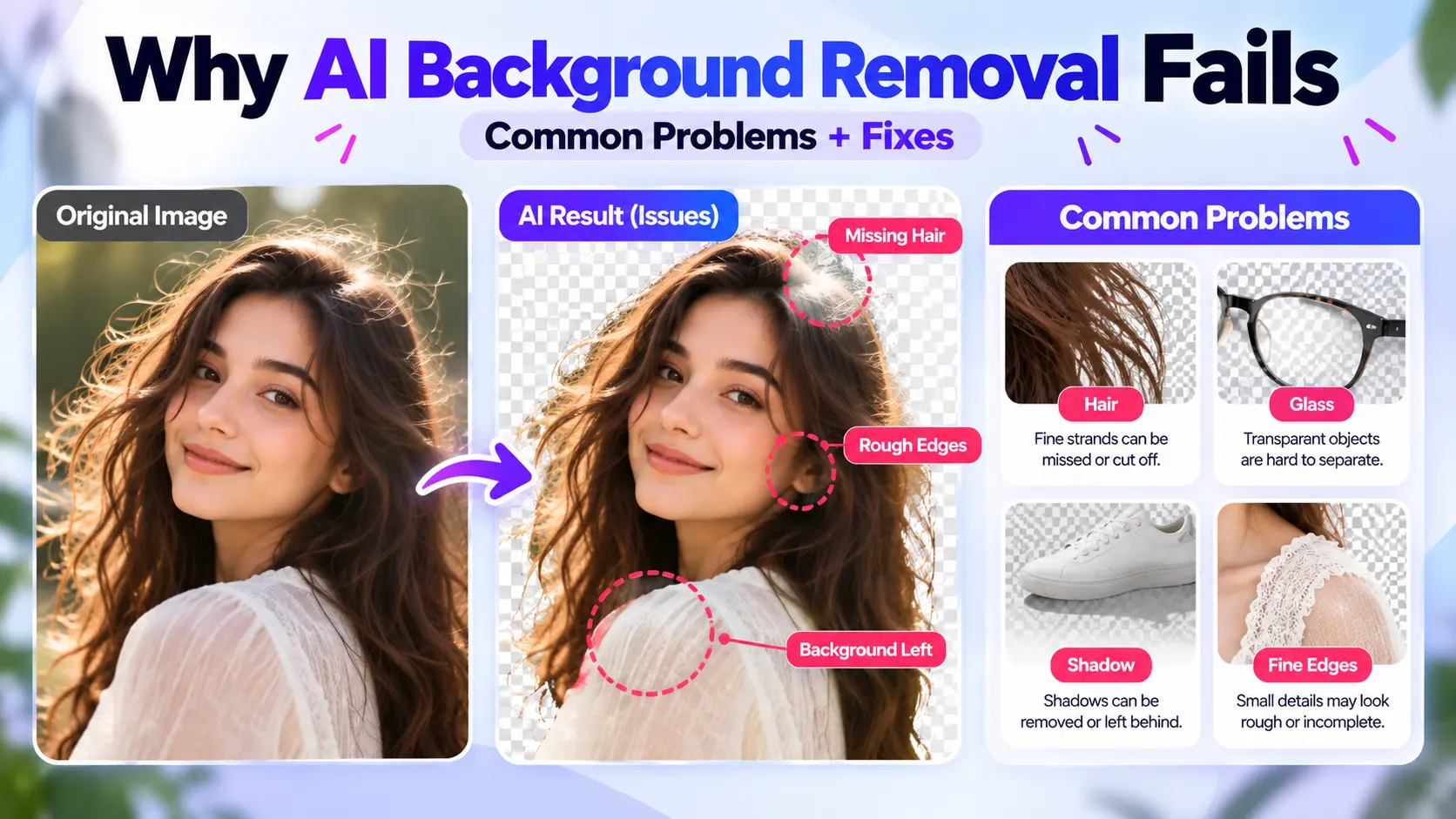
AI background removers can produce clean cutouts automatically, but some images are much harder to separate than others. Fine hair, transparent objects, motion blur, low contrast, reflections, shadows, low resolution, and similar foreground/background colors can all make it difficult for AI to determine exactly where the subject ends and the background begins.
Below are the most common reasons background removal fails, and practical ways to improve the result.
Try ByByBG Background Remover →
How AI Decides What Is Background
Before getting into troubleshooting, it helps to understand the basic mechanism:
Input Image
↓
Image Analysis
↓
Subject/Foreground Detection
↓
Segmentation
↓
Mask Creation
↓
Edge Refinement
↓
Background Removal
For the complete process, read How AI Background Removal Works.
AI doesn't "see" an image the way a person does. The model estimates which pixels are foreground and which are background based on learned visual patterns and features — it's a prediction, not a certainty.
Why Does AI Background Removal Fail?
Most failures happen when the visual evidence separating the subject from the background is weak, ambiguous, unusually complex, or partially missing. Here are the specific situations where that tends to happen.
1. Subject and Background Have Similar Colors
A white shirt against a white wall, a green object among green plants, or a dark product on a dark background all share a common problem: a weak boundary between subject and background.
This can result in part of the subject being removed, part of the background being retained, or rough, uneven edges.
How to improve it
Use stronger contrast between subject and background where possible
Try a different source photo
Improve lighting so the subject stands out more clearly
Avoid letting the subject visually blend into the backdrop
2. Hair and Fur Have Fine, Complex Edges
Long hair, curly hair, flyaway strands, beards, and other fine hair details all share the same challenge: the boundary isn't a clean, solid line. There can be foreground pixels, background pixels, and semi-transparent edge pixels mixed together.
How to improve it
Use a higher-resolution source image
Improve contrast between hair and background
Use a sharp, in-focus photo
Avoid severe compression
Inspect the output carefully around hair
3. Transparent Objects Are Difficult to Separate
Glass, bottles, sunglasses, clear plastic, and transparent packaging all share a fundamental problem: the background is actually visible through the object.
This raises a genuinely hard question for the model: is a given pixel background, foreground, or a partially transparent mix of both? That's inherently more difficult than cutting out an opaque shoe.
Possible results include the glass partly disappearing, unnatural-looking transparency, or background remaining visible inside the object.
4. Reflections Can Confuse Background Removal
Metal, chrome, jewelry, glossy products, cars, mirrors, and screens often reflect the surrounding environment. The model has to distinguish the actual object from the background that's being reflected by it — and that distinction can create segmentation errors.
5. Low-Resolution Images Hide Important Details
In a low-resolution image, fine hair can disappear, edges become pixelated, small gaps merge together, and product details become unclear.
AI cannot reliably reconstruct boundary detail that isn't clearly represented in the source image to begin with.
How to improve it
Use the best available original rather than a screenshot, a repeatedly compressed image, a tiny thumbnail, or an enlarged low-resolution copy.
6. Blurry or Out-of-Focus Images Cause Edge Problems
Motion blur or focus blur creates uncertain boundaries. Instead of a clean split between subject and background, the image has a blended transition zone between the two.
This can result in a soft cut, a missing edge, or a visible halo around the subject.
How to improve it
Use a sharper source photo whenever possible.
7. Shadows Can Be Mistaken for Background or Foreground
Consider a product sitting on a table with a natural shadow underneath it. The model has to decide: is that shadow part of how the product is presented, or is it removable background? There isn't always one universally correct answer.
Possible outcomes include the shadow being removed entirely, partially retained, left with a jagged edge, or the product ending up looking like it's floating unnaturally.
This is especially relevant for product photography.
See How to Remove Background from Product Photos.
8. White Objects on White Backgrounds Are Challenging
A white shoe, a white T-shirt, a white mug, white packaging, or a white logo on a white background all share the same core problem: foreground and background have very similar brightness and color.
This can lead to product edges being removed, white portions of the subject becoming transparent, or background remaining where it shouldn't.
Read How to Remove White Background from an Image.
9. Multiple People or Objects Can Confuse Subject Detection
A group photo, a person holding an object, multiple products in one frame, or a crowded scene all raise the same question for the model: which object is the intended subject?
Possible results include a secondary subject being removed, an unwanted person being retained, or an object being cut incorrectly.
10. Overlapping Objects Make Boundaries Ambiguous
A person holding a handbag, a hand overlapping a bag, hair overlapping clothing, or one product overlapping another all require the model to infer object boundaries even though parts of each object are hidden. Segmentation mistakes can happen as a result.
11. Thin Objects and Small Details Can Disappear
Jewelry chains, wires, eyeglass frames, bicycle spokes, plant stems, shoelaces, straps, and antennas can all occupy just a few pixels in an image. The model may end up classifying them as background noise rather than part of the subject.
How to improve it
Use a high-resolution, sharp, well-lit source image.
12. Holes and Interior Spaces Can Be Misclassified
A mug handle's interior hole, the spaces between bicycle spokes, the gaps between chair legs, and the counters in letters like A, O, P, or R all require the model to understand both the object's exterior and its interior negative space. Background can sometimes remain visible inside these areas after removal.
13. JPEG Compression Can Damage Edges
Heavy JPEG compression introduces artifacts, color blocks, edge noise, and halos, which can make segmentation harder around important boundaries.
To be clear: this isn't a case of "JPG is bad." A high-quality JPG can work well. It's specifically heavily compressed images that are more likely to contain artifacts around important edges.
See PNG vs JPG: Which Image Format Is Better for Your Images?.
14. Complex Backgrounds Can Cause Incorrect Segmentation
A forest, a crowded room, a patterned wall, a street scene, furniture, similar nearby objects, or a busy retail environment can all contain visual patterns that overlap, semantically or visually, with the subject itself. This can leave background patches remaining, parts of the subject removed, or a rough overall boundary.
15. Semi-Transparent Details Are Hard
Distinct from fully transparent objects, things like a veil, smoke, sheer fabric, thin fabric, translucent plastic, or motion-blurred hair occupy a genuine gray area: a given pixel can be part subject and part background at the same time. A simple binary keep-or-remove decision isn't always sufficient for these cases.
16. Very Small Subjects Can Be Missed
In a large landscape image with a tiny person or object in it, the model may end up focusing on the dominant visual region instead of the intended small subject.
How to improve it
Where appropriate, try cropping closer to the subject before processing, or use a higher-resolution source image. This can give the model a clearer view of the intended subject, although it doesn't guarantee a correct result in every case.
17. Unusual Objects May Be Harder to Recognize
AI performance depends partly on learned visual patterns, so common, familiar subjects tend to be easier than unusual shapes, abstract artwork, specialized equipment, or odd compositions. Unusual visual structures can sometimes make foreground identification more difficult.
Why Does Background Removal Leave White Edges?
Possible causes include the original white background bleeding into edge pixels, anti-aliasing, compression, soft focus, incomplete segmentation, or fine hair and fur at the boundary.
A practical test: place the cutout temporarily over a dark or contrasting background to reveal any pale halos that are hard to spot against a white page.
See How to Remove White Background from an Image.
Why Does AI Remove Part of the Subject?
This usually comes down to one or more of the causes already covered: similar colors, fine details, transparency, blur, low resolution, occlusion, weak contrast, or complex geometry.
Why Does Some Background Remain After Removal?
Common causes include interior spaces, similar textures between subject and background, a complex scene, shadows, reflections, gaps within hair, or transparent objects.
How to Get Better AI Background Removal Results
Start with a high-resolution image
Use sharp, focused photos
Improve foreground/background contrast
Use good lighting
Avoid severe JPEG compression
Keep the full subject visible in the frame
Crop excessive empty space when useful
Avoid unnecessary overlapping objects
Inspect fine edges after processing
Check transparent or reflective objects carefully
Preview the output against contrasting backgrounds
Try a better source photo when one is available
Does a Failed Result Mean AI Background Removal Doesn't Work?
No single background-removal method is equally reliable for every image. Automatic AI removal is especially useful when the subject has clear boundaries, while more difficult images may need a different source photo or some manual refinement.
See AI Background Remover vs Photoshop for a comparison of automated removal and more manually controlled workflows.
AI Background Removal vs Manual Refinement for Difficult Images
That last row matters: manual editing isn't magic either. Bad source data can limit both approaches.
When Should You Try Another Image?
Consider using a different source photo if:
The subject is severely blurred
The resolution is extremely low
Major portions of the subject are hidden
The subject and background are nearly indistinguishable
The image has severe compression artifacts
Important transparent details have been lost
A better original is available
Sometimes a better input beats more editing.
How ByByBG Handles Background Removal
The workflow is straightforward:
Upload
↓
AI Processing
↓
Background Removal
↓
Preview
↓
PNG Download
Results can vary with image complexity, so it's worth inspecting fine edges and any difficult transparent or reflective areas before using the final image.
Try ByByBG Background Remover →
Frequently Asked Questions
Why does AI background removal sometimes fail?
It generally fails when the visual boundary between subject and background is weak or ambiguous — due to similar colors, fine detail, transparency, blur, or low resolution.
Why does a background remover remove part of my image?
This usually happens when part of the subject shares visual similarity with the background, or when fine details like thin edges or hair are hard for the model to distinguish.
Why does AI cut off hair?
Hair has fine, complex, semi-transparent edges that are genuinely difficult to segment precisely, especially in lower-resolution or lower-contrast images.
Why does the background remain between hair?
Gaps between hair strands can be too fine for the model to fully resolve, leaving small traces of background visible.
Why does background removal leave white edges?
This can result from anti-aliasing, compression, soft focus, or the original background bleeding into edge pixels during segmentation.
Why are transparent objects difficult to remove from backgrounds?
Because the background is partially visible through the object itself, making it hard to classify each pixel as purely foreground or background.
Why does AI struggle with white objects?
A white object on a white background has very little contrast, which makes it harder for the model to tell subject and background apart.
Can low image quality affect background removal?
Yes. Low resolution hides fine detail the model needs to produce an accurate cutout.
Does JPG compression affect background removal?
Heavy JPEG compression can introduce artifacts around edges that make segmentation harder, though a high-quality JPG generally works fine.
How can I improve AI background removal?
Use a high-resolution, sharp, well-lit source image with good contrast between subject and background, and inspect the result carefully afterward.
Can AI remove complex backgrounds?
AI can often handle complex backgrounds, though results vary depending on how much the background visually overlaps with the subject.
Can AI remove backgrounds from glass objects?
AI can process glass objects, but results can be less consistent due to transparency and reflections.
Is Photoshop better when AI background removal fails?
Photoshop can offer more manual control for difficult cases, though it can't fully compensate for a very low-quality or ambiguous source image.
Does a higher-resolution image improve background removal?
A higher-quality, higher-resolution source can give the model more usable detail around fine edges, but resolution alone does not guarantee a better cutout. Focus, contrast, lighting, and image complexity also matter.
Why does some background remain inside objects?
Interior spaces, like the hole in a mug handle or gaps in a bicycle wheel, can be misclassified, leaving small traces of background visible inside the subject.
Conclusion
AI background removal works by predicting which pixels belong to the foreground and which belong to the background. When the visual boundaries are ambiguous — because of similar colors, fine hair, transparency, blur, low resolution, or a complex scene — even a capable model can make mistakes.
Understanding what makes an image difficult can help you choose better source photos, know what to inspect in the result, and decide when manual refinement is worth the extra step.
Ready to try it with a better source image? Try ByByBG Background Remover →