
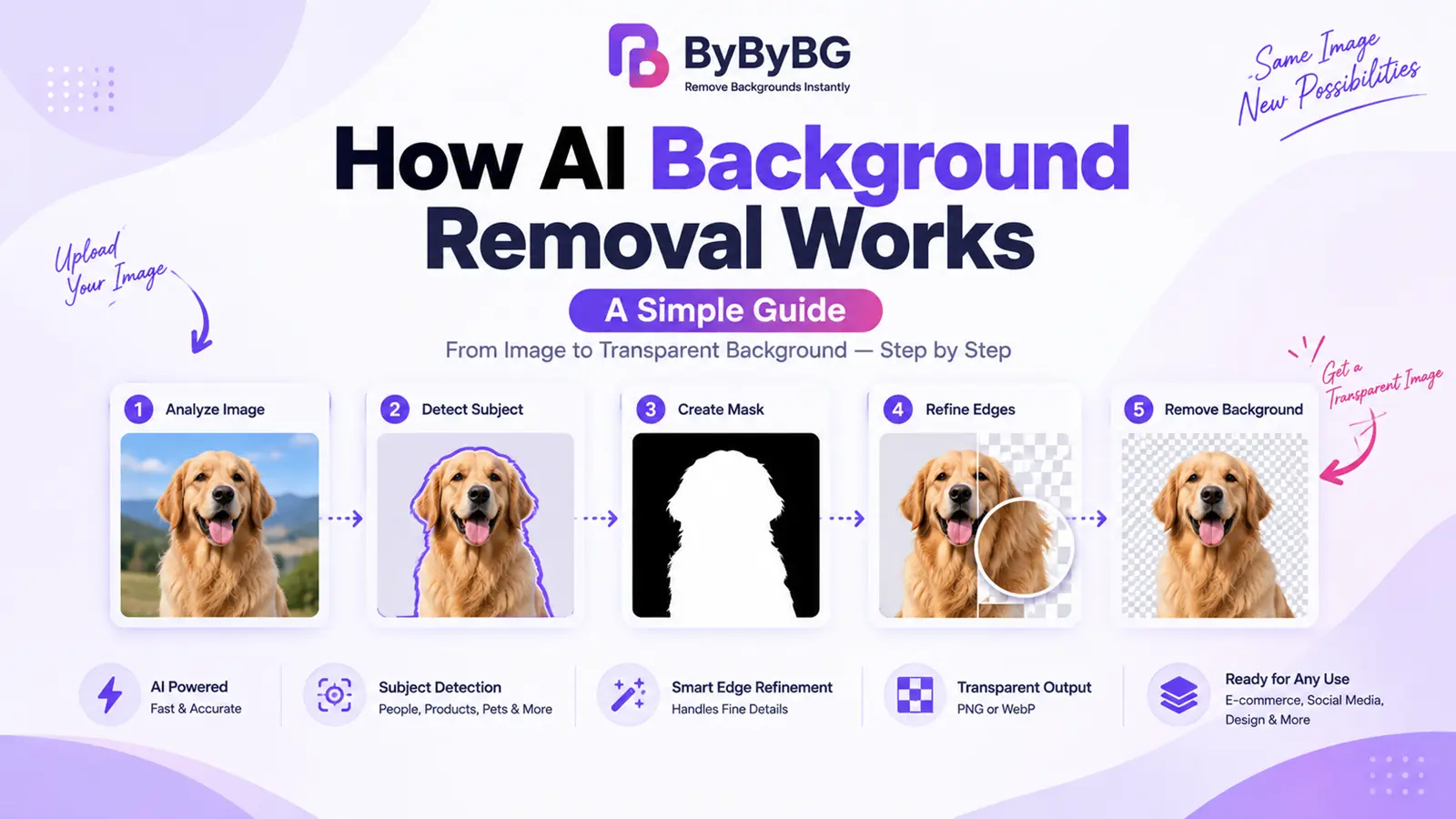
AI background removal uses computer vision and machine-learning models to identify the main subject in an image, separate it from the surrounding background, refine the subject's edges, and produce an image with the background removed or made transparent.
In other words, AI is trying to answer one basic question: which pixels belong to the subject, and which pixels belong to the background? Everything else in the process — detection, masking, edge refinement — exists to answer that question as accurately as possible.
What Is AI Background Removal?
Traditional background removal is a manual process. It usually means opening an image editor, selecting the subject by hand with tools like the pen tool or lasso tool, and carefully cutting it away from its background — a process that can take several minutes even for a fairly simple photo.
AI background removal automates that same basic idea. Instead of a person manually tracing an outline, a machine-learning model analyzes the image, automatically detects the subject, separates it from the background, and produces a transparent output — typically in a few seconds. The core steps are similar to manual editing (detect the subject, separate it, clean up the edges), but AI performs them automatically rather than requiring a person to do each step by hand.
How Does AI Background Removal Work?
AI background removal generally follows a sequential process. Each stage builds on the one before it, starting with a raw image and ending with a clean, transparent result.
1. The AI Analyzes the Image
The process starts with the AI model analyzing the visual patterns in the image, including shapes, edges, colors, textures, objects, and how different elements relate to each other spatially. This initial analysis gives the model the information it needs to make sense of what's actually in the photo.
2. AI Detects the Main Subject
Next, the model tries to answer a simple question: what is the primary object, person, or animal in this image? This could be a person, a product, a car, a shoe, a pet, a piece of furniture, or a food item — the model is trained to recognize a wide range of common subjects.
3. AI Separates Foreground From Background
This is the core concept behind background removal. The foreground is the subject, and the background is everything surrounding it. An AI segmentation model works to classify the image at the pixel or region level, effectively deciding which parts belong to the foreground and which belong to the background.
4. AI Creates a Mask
Once the subject has been detected, the system creates a mask — a conceptual map that describes which parts of the image should be kept and which should be removed. As a simple way to picture it: an opaque area represents "keep," and a transparent area represents "remove." The exact technical implementation varies between models and tools, but this is the general idea behind how a mask works.
5. Edge Refinement
Fine details are often the hardest part of background removal. Hair, fur, fingers, clothing edges, thin objects, and glass all require extra care, since simple objects with clean, solid outlines are much easier for a model to handle than fine or semi-transparent detail. During edge refinement, the model attempts to smooth and improve the mask around these tricky areas so the final cutout looks natural rather than harshly clipped.
6. Background Is Removed
Using the refined mask, the unwanted background pixels are removed or made transparent, leaving the subject isolated from its original surroundings.
7. Final Image Is Generated
The result is then exported in a format that supports transparency, commonly PNG or WebP, so the removed background can remain transparent. The overall flow looks like this:
Original Image
↓
Subject Detected
↓
Mask Created
↓
Edges Refined
↓
Background Removed
↓
Transparent Image
How Does AI Know What Is the Background?
AI doesn't simply look for "the color behind an object." Instead, it relies on a combination of visual cues, including object boundaries, textures, shapes, contrast, context, and patterns it has learned from large amounts of training data.
For example, a person standing in front of a plain wall is a relatively straightforward case: the person is the foreground, and the wall is the background. But a person wearing a shirt with colors similar to the background behind them can be more difficult, since there's less contrast for the model to rely on when deciding where the subject ends and the background begins.
What Is Image Segmentation?
Image segmentation is the process of dividing an image into meaningful regions so a system can determine which pixels belong to which object or area. It's a broader computer vision concept, and background removal is essentially one practical application of it: the image is segmented into "subject" and "background," and the background portion is then removed or made transparent.
How Are AI Background Removal Models Trained?
AI background removal models are trained using large collections of images and examples that help the model learn how subjects and backgrounds differ. During training, the model learns visual patterns such as shapes, edges, textures, and object boundaries. Over time, this allows it to make predictions about which parts of a new image are likely to belong to the subject.
What Is a Background Removal Mask?
A mask is the intermediate result that tells the system which areas of the image to keep and which to discard. It sits between the AI's initial prediction and the final transparent output. The general flow looks like this:
Original Image
↓
Subject Detection
↓
Segmentation Mask
↓
Edge Refinement
↓
Transparent Output
How Does AI Handle Hair and Fine Details?
Hair and other fine details are one of the most challenging parts of background removal, whether it's done manually or with AI. Individual hair strands, semi-transparent edges, fur, motion blur, low-resolution source images, and subjects with colors similar to the background can all make it harder for a model to produce a clean edge.
Advanced models attempt to address this by refining edge predictions specifically around fine detail, rather than treating the entire subject outline the same way. That said, it's worth being realistic: AI does not perfectly preserve every single hair strand in every image, and results can vary depending on the photo's resolution, lighting, and contrast.
How Does AI Remove Backgrounds from Product Photos?
Product photography is one of the most common practical uses of AI background removal. This applies to a wide range of product types, including shoes, clothing, electronics, cosmetics, furniture, jewelry, and food products.
Product photography often benefits from clean cutouts, since a well-isolated product can then be placed on a white, colored, or custom background — useful for online stores, catalogs, and marketing material.
Ready to try it? Remove a product background with ByByBG
How Does AI Remove Backgrounds from Portraits?
For portraits, AI models generally try to identify the face, body, clothing, and hair as part of the subject. This tends to work well for straightforward portraits, but fine hair detail and overlapping objects (like a hand resting near the face, or hair blending into a similarly colored background) can still be more challenging than a simple, well-lit headshot against a plain background.
Can AI Remove Complex Backgrounds?
AI background removal can handle a wide range of backgrounds, but some scenarios are more difficult than others:
Simple background: Usually the easiest case, since there's a clear contrast between subject and background.
Busy background: More challenging, since there's more visual information for the model to interpret.
Similar colors: More difficult, since low contrast between subject and background makes edges harder to detect.
Multiple people: Requires the model to understand and separate more than one subject at once.
Hair and fur: A common fine-detail challenge, as discussed above.
Transparent or reflective objects: Can be difficult, since glass, water, and reflective surfaces don't have a single, well-defined edge.
Low-resolution images: Give the model less visual information to work with, which can reduce accuracy.
AI Background Removal vs Manual Background Removal
AI is an excellent option when you need fast, automatic results across one image or many. Manual editing can still be worthwhile when a project needs pixel-level precision that an automated tool doesn't yet provide.
AI Background Removal vs Photoshop
Photoshop provides extensive manual editing control, including layer-based masking, fine-grained pen-tool selections, and detailed retouching tools. AI background removers take a different approach, focusing on speed and automation rather than manual control.
Neither approach is strictly "better" in every situation — they're suited to different needs. For a quick, automatic cutout, an AI background remover is usually faster and more accessible. For projects that need precise, manual pixel-level adjustments, Photoshop's toolset still offers a level of control that fully automated tools don't replace.
Does AI Background Removal Reduce Image Quality?
Background removal itself doesn't inherently require heavy compression, but the quality of the final result can be affected by several factors: the original image's resolution, the processing method used, any resizing that happens along the way, edge processing, and the output format the image is saved in.
Using a high-quality source image and an appropriate output format helps preserve detail. If you need transparency, PNG can preserve a transparent background, while JPG does not support transparency at all.
For a closer look at how these formats compare, see our guide: PNG vs JPG: Which Image Format Is Better for Your Images?
What Happens After the Background Is Removed?
Once a background has been removed, there are several common next steps, including:
Downloading the transparent PNG
Adding a new background
Changing the background color
Creating product images for a store or catalog
Resizing the image
Compressing the image for web use
Using the image on a website
Creating social media graphics
If you haven't removed a background yet, our step-by-step walkthrough covers the process from start to finish: How to Remove Background from an Image Online for Free
Why Use an AI Background Remover Online?
Online AI background removers are useful when speed and simplicity matter. They can automate subject detection and background removal without requiring manual selection tools, making them practical for product images, portraits, social graphics, and other routine editing tasks. Try ByByBG Background Remover https://bybybg.com/→
How to Use ByByBG AI Background Remover
Open ByByBG Background Remover. Go to the tool in your browser — no installation needed.
Upload your image. Choose the photo you want to process.
Let the AI process the image. The subject is automatically detected and separated from the background.
Review the result. Check the edges and fine details before downloading.
Download the result. Save the transparent image to use however you need.
Tips for Better AI Background Removal Results
Use a clear image with a distinguishable subject
Avoid extremely low-resolution images
Make sure the subject is clearly visible
Avoid excessive blur in the source photo
Check hair and fine edges before downloading
Review transparent areas closely before using the final image
Use the right output format for your needs (PNG or WebP for transparency).
Frequently Asked Questions
How does AI background removal work?
AI analyzes an image, detects the main subject, separates it from the background using a segmentation mask, refines the edges, and generates a final image with the background removed or made transparent.
How does AI know what part of an image is the background?
AI relies on visual cues such as object boundaries, textures, shapes, contrast, and patterns learned from training data — not simply the color of the area behind a subject.
What is image segmentation in background removal?
Image segmentation is the process of dividing an image into meaningful regions so a system can tell which pixels belong to which object. Background removal applies this by segmenting an image into "subject" and "background."
What is a background removal mask?
A mask is a conceptual map that describes which parts of an image should be kept (the subject) and which should be removed (the background).
Can AI remove backgrounds from photos?
Yes. AI background removers can process a wide range of photo types, including product photos, portraits, logos, and images of pets or animals.
Can AI remove backgrounds from hair?
AI can process hair and attempt to refine the edges around it, but hair remains one of the more challenging details to handle perfectly, especially in low-resolution or low-contrast images.
Can AI remove complex backgrounds?
AI can often handle busy or complex backgrounds, though results can vary depending on contrast, image quality, and how distinct the subject is from its surroundings.
Does AI background removal reduce image quality?
Not inherently, but quality can be affected by the original resolution, processing method, resizing, and the output format used to save the result.
Can AI remove a background without Photoshop?
Yes. Online AI background removers can detect and remove a background automatically, without requiring manual selection tools or design software like Photoshop.
Is AI background removal free?
Many AI background removers, including ByByBG, offer free background removal, though features like resolution limits or watermarks can vary between tools.
Can AI make an image background transparent?
Yes. After the background is detected and removed, the result is typically saved with a transparent area in place of the original background.
What image format is best after background removal?
PNG is the most widely compatible format for preserving transparency. WebP also supports transparency and can offer smaller file sizes for web use.
Conclusion
AI background removal works by analyzing an image, detecting the main subject, separating it from the background through segmentation and masking, refining fine details like hair and edges, and generating a final transparent image. It's not a perfect process for every photo, but for most everyday use cases — product photos, portraits, logos, and more — it offers a fast, accessible alternative to manual editing.
Ready to see it in action? Try ByByBG Background Remover https://bybybg.com/→