
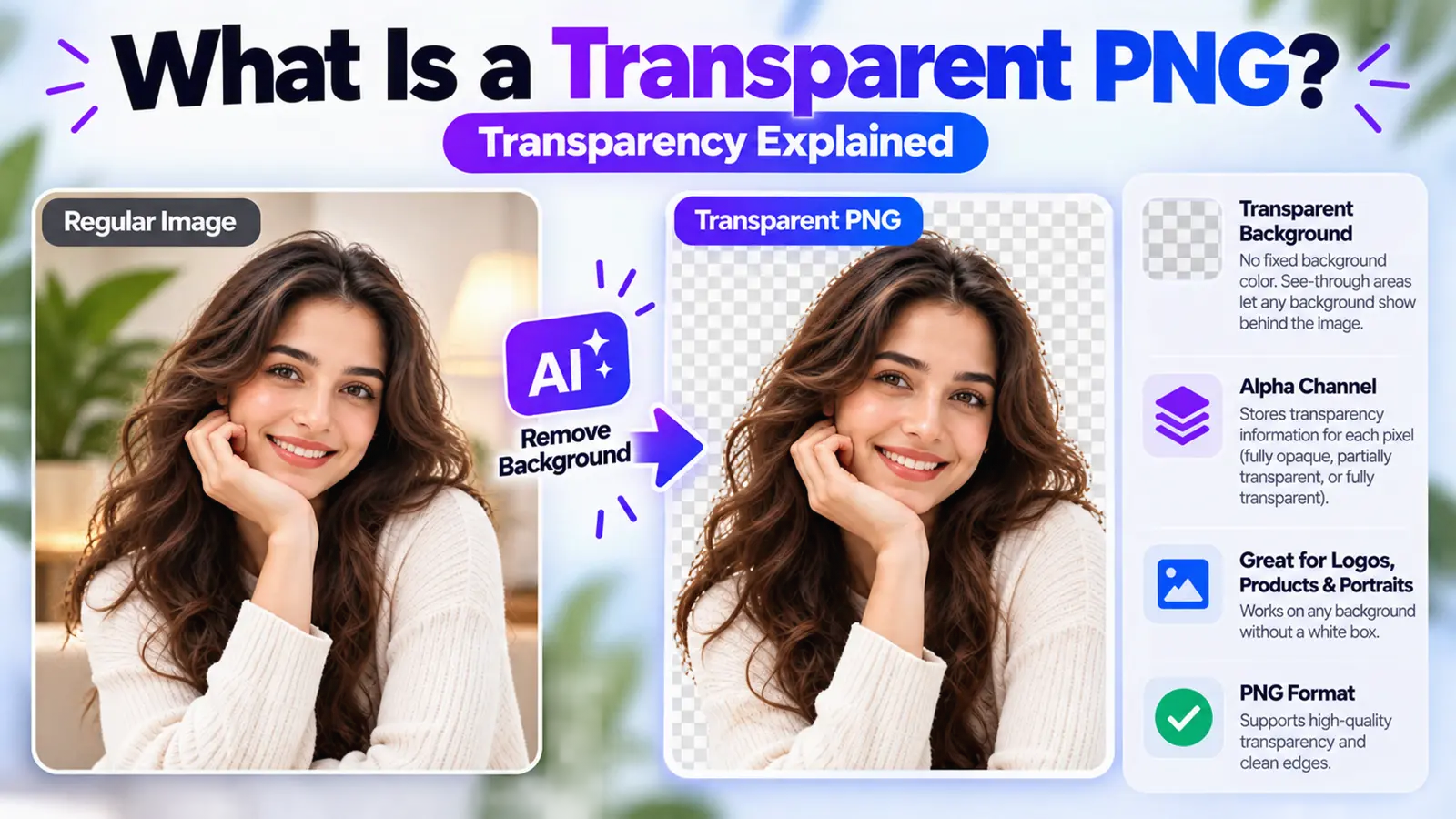
A transparent PNG is a PNG image that contains transparent or partially transparent pixels. Instead of displaying a fixed background color such as white, transparent areas allow whatever is behind the image to show through.
Think of a logo saved two different ways: one version sits inside a visible white rectangle, while the other has transparent surroundings and blends cleanly into any page or design behind it. That difference is what a transparent PNG makes possible.
Create a Transparent PNG with ByByBG →
What Does Transparent PNG Mean?
Imagine a portrait photo with the background removed. Originally, the image shows a person standing in front of a white wall. After the background is removed, the image becomes just the person, with a transparent area where the wall used to be.
PNG is able to store that transparency information directly in the file. As a result, the same person can appear over white, black, blue, a website background, a design, or an advertisement — without a rectangular background following them around.
How Does PNG Transparency Work?
Normal color information in an image is made up of red, green, and blue values for each pixel. A format that supports transparency can additionally represent how opaque or see-through each pixel is.
Conceptually, this adds a fourth piece of information to each pixel:
Red
↓
Green
↓
Blue
↓
Alpha (Opacity)
The alpha value determines how visible a pixel is. The PNG format supports a full alpha channel as part of its transparency and compositing capabilities, defined in the official W3C PNG specification.
What Is an Alpha Channel?
An alpha channel represents opacity information alongside a pixel's color information, allowing pixels to be fully opaque, partially transparent, or fully transparent.
R: Red
G: Green
B: Blue
A: Alpha, or opacity
In simple terms:
Fully opaque: The subject is completely visible.
Partially transparent: The background shows through the pixel to some degree.
Fully transparent: The pixel visually disappears, and whatever is behind it shows through completely.
Transparent vs Semi-Transparent Pixels
It's easy to assume transparency is simply on or off — visible or invisible. But PNG also supports intermediate levels of transparency, not just a strict either/or.
This matters for details like:
Hair
Soft shadows
Glass
Anti-aliased edges
Glow effects
Smoke
Soft transitions between subject and background
The W3C's PNG documentation specifically describes support for variable, partial transparency, which helps images blend smoothly over different backgrounds instead of producing a crude, hard-edged cutout.
Why Does a Transparent PNG Show a Checkerboard?
A gray-and-white checkerboard pattern usually means: no fixed background is present in that area of the image. The checkerboard itself is not part of the actual image — it's commonly just how image editors and viewers represent transparency on screen.
One practical warning worth knowing: taking a screenshot of a checkerboard preview will bake that checkerboard pattern permanently into the resulting image, since a screenshot has no transparency of its own.
Are All PNG Images Transparent?
No. This is worth addressing directly, since it's a common misconception.
A PNG file can contain any of the following:
A PNG with a white background
A PNG with a black background
A PNG with a colored background
A PNG with actual transparency
The .png file extension alone doesn't prove that an image contains transparent pixels.
Why Does My PNG Have a White Background?
There are several possible explanations:
The white pixels are genuinely part of the original image
The background was never actually removed
The export process flattened the transparency into a solid color
The app or viewer you're using displays transparency as white
The image was converted incorrectly at some point
A background that looks white and a background that's actually made of white pixels aren't always the same thing. The most reliable way to check is to view the image over a colored background instead of a white one.
See How to Remove White Background from an Image.
Transparent Background vs White Background
The key idea to take away: white is a color. Transparent means the background isn't visibly filled in at all.
Transparent PNG vs JPG
Transparent PNG: Can support transparency, uses lossless encoding, and is useful for cutouts, logos, and graphics.
JPG: Standard JPEG does not carry an alpha channel for transparency, uses lossy compression, and is commonly suited to photographic imagery where transparency isn't required.
Read our complete comparison: PNG vs JPG: Which Image Format Is Better for Your Images?
Transparent PNG vs WebP
PNG isn't the only image format that can preserve transparency.
PNG: Supports transparency, uses lossless compression, and has broad, long-established support.
WebP: Can also preserve transparency, and supports modern web-image workflows. WebP's lossless specification includes alpha and transparency data as part of the format.
What Are Transparent PNGs Used For?
Logos: Placing the same logo over different backgrounds.
Product images: Reusable product cutouts.
Portraits: A person isolated from their original scene.
Icons: No visible rectangular background.
Stickers: Isolated designs.
Watermarks: Especially useful with partial opacity.
Social media graphics: Layering an image over a design.
Presentations: Placing cutouts over slides.
Websites: Overlaying graphical elements.
Advertising: Reusing a subject or product across multiple creatives.
Why Are Transparent PNGs Useful for Background Removal?
Original Image
↓
Subject Detected
↓
Background Removed
↓
Background Area Becomes Transparent
↓
Transparent Output
That's why a transparent PNG is a natural output for background-removal workflows. Learn more in How AI Background Removal Works.
How to Create a Transparent PNG
Choose your image. Pick the photo you want to process.
Remove the background. Let an AI background remover detect and separate the subject.
Check the edges. Review hair, thin details, and any fine edges.
Make sure the background is transparent. Not just a different solid color.
Export or download as PNG. Save the result in a format that preserves the transparency.
Create a Transparent PNG with ByByBG →
How to Make an Existing Image Transparent
The input image could be a JPG, JPEG, PNG, or WebP file. Background removal separates the subject from its surroundings, and the result is then exported into a format that supports transparency.
For the full walkthrough, see How to Make an Image Background Transparent.
Can You Make a JPG Transparent?
You can use a JPG as the input: remove its background, and save the result in a format that supports transparency. Simply keeping the file as an ordinary JPEG afterward will not preserve the transparent pixels, since standard JPEG doesn't support an alpha channel.
JPG
↓
Background Removal
↓
Transparency
↓
PNG or Other Transparent Format
How to Tell If a PNG Is Really Transparent
Place it over a colored background. This is the most reliable visual test.
Open it in an editor or viewer that displays transparency. Look for the checkerboard pattern — keeping in mind that's a UI representation, not part of the file.
Move the image over different backgrounds. If the surroundings show through or adapt, transparency genuinely exists.
Why Does a Transparent PNG Turn White After Saving?
Several things can cause this:
Incorrect export settings
An app flattening the image during export
Converting the file to JPG
A clipboard or screenshot-based workflow
Software that simply doesn't preserve transparency
A viewer that renders transparent areas over a white backdrop by default
Why Does a Transparent PNG Have White Edges?
Possible causes include:
The original white backdrop
Anti-aliased edge pixels
Imperfect segmentation
Compression or source artifacts
Fine hair or other delicate edges
General white color contamination at the boundary
A useful tip: preview the cutout against a dark background to make any remaining white edges easier to spot.
See How to Get Better AI Background Removal Results.
Does Transparent PNG Mean Background Removed?
Not necessarily. A transparent PNG simply contains transparent or partially transparent pixels. In a background-removal workflow, those transparent areas often represent a removed background, but a PNG can also be designed with transparency from the start, such as a logo, icon, graphic asset, or manually masked image.
Does Transparency Reduce Image Quality?
Transparency itself isn't the same thing as lossy compression. PNG uses lossless compression, meaning it doesn't discard image data the way JPEG does.
That said, the final appearance can still depend on other factors, including the original source image, the quality of the background removal, edge processing, resizing, any prior compression, and the overall export workflow. PNG doesn't guarantee that an image can never lose quality through any editing process.
Why Can Transparent PNG Files Be Large?
PNG uses lossless compression, while JPEG uses lossy compression. As a result, photographic content saved as PNG can sometimes be considerably larger than an equivalent JPEG. The W3C's own documentation notes that JPEG is well suited to the lossy storage of appropriate photographic images, rather than positioning PNG as universally preferable.
File size depends on several factors:
Image dimensions
Color complexity
Alpha or transparency information
The overall content of the image
Encoding and optimization settings
Transparent PNG for Product Photos
Imagine a shoe photographed against a cluttered room background. Once the background is removed, the result is a transparent shoe PNG — an asset that can then be placed on a white store background, an ad banner, a brand color, a social post, or a catalog page, without reshooting the product each time.
See How to Remove Background from Product Photos.
Transparent PNG for Logos
A transparent logo avoids the awkward white rectangle that shows up when a logo with a solid background is placed over a colored or dark design.
One piece of expert advice worth following: if the original logo already exists as a vector file or an already-transparent source, use that directly rather than performing unnecessary background removal on a flattened image.
Transparent PNG for Portraits
Common use cases include profile graphics, thumbnails, posters, social graphics, presentations, and marketing designs.
Fine hair tends to make a clean, fully transparent result more challenging to achieve than with simpler subjects.
See How to Get Better AI Background Removal Results.
Common Transparent PNG Mistakes
Mistake 1: Assuming every PNG is automatically transparent.
Mistake 2: Saving a transparent image as a JPG, which loses the transparency.
Mistake 3: Screenshotting a checkerboard preview instead of exporting the real file.
Mistake 4: Mistaking a white appearance for actual transparency.
Mistake 5: Ignoring white or dark edge halos around the subject.
Mistake 6: Using a low-resolution source image.
Mistake 7: Flattening layers or the background during export.
Mistake 8: Using PNG for every image, regardless of whether the use case actually needs it.
That last one is worth remembering: PNG isn't automatically the "best" format for every situation.
When Should You Use a Transparent PNG?
You need a transparent background
A logo needs flexible placement across different designs
A product cutout needs to be reused across multiple contexts
The subject will be composited into another image or design
The graphic contains transparent or soft edges
A lossless raster output is genuinely useful
When Might You Not Need a Transparent PNG?
The background is intentionally fixed and part of the image
It's a normal photograph that doesn't need transparency
Transparency simply isn't required for the use case
A smaller photographic file size matters more
Another modern format fits the workflow better
Frequently Asked Questions
What is a transparent PNG?
A PNG image that contains transparent or partially transparent pixels, allowing whatever is behind the image to show through instead of a fixed background color.
What does transparent PNG mean?
It means the file stores transparency information for some or all of its pixels, rather than filling every pixel with an opaque color.
Does PNG support transparency?
Yes. PNG supports a full alpha channel as part of its specification, which allows for transparent and partially transparent pixels.
Are all PNG files transparent?
No. A PNG can have a solid white, black, or colored background just as easily as a transparent one. The file extension alone doesn't confirm transparency.
What is an alpha channel in PNG?
The alpha channel stores opacity information for each pixel, separate from its red, green, and blue color values.
Why does transparent PNG show a checkerboard?
The checkerboard is a visual convention many editors and viewers use to represent transparency on screen. It isn't actually part of the image file.
Why does my PNG have a white background?
The white pixels may genuinely be part of the image, the background may never have been removed, or the transparency may have been flattened during export or conversion.
How do I make a PNG transparent?
Remove the background from the image using a background remover, then export or save the result as a PNG, making sure the removed area is transparent rather than filled with a solid color.
Can a JPG have a transparent background?
No. Standard JPEG doesn't support an alpha channel, so it can't store transparent pixels directly.
Is PNG better than JPG for transparency?
For transparency specifically, yes — PNG supports it and JPG doesn't. For ordinary photographic images without transparency needs, JPG is often a more practical choice.
Can WebP have a transparent background?
Yes. WebP also supports transparency, including in its lossless mode, and can be a smaller alternative to PNG for web use.
How do I know if a PNG is transparent?
Place it over a colored background, or view it in an editor that displays a checkerboard pattern for transparent areas.
Why did my transparent PNG turn white?
This is often caused by export settings, an app flattening the image, or converting the file to a format that doesn't support transparency.
Why does my transparent PNG have white edges?
This can result from anti-aliasing, the original background bleeding into edge pixels, or imperfect segmentation around fine details.
Does transparency reduce image quality?
Not inherently — PNG uses lossless compression. However, overall quality can still be affected by the source image, processing, and export workflow.
Conclusion
A transparent PNG is simply a PNG image where some or all of the pixels carry transparency information, letting whatever is behind the image show through instead of a fixed background. Not every PNG is transparent — the format supports it, but doesn't require it — which is why it's worth checking an image over a colored background before assuming it's ready to use.
Once you understand how the alpha channel and checkerboard preview work, transparent PNGs become a genuinely useful tool for logos, product photos, portraits, and anything else you want to reuse across different backgrounds and designs.
Ready to create one? Create a Transparent PNG with ByByBG →